
FRITZ!Box 7530 AX Setup Guide With FRITZ Repeater 1200 AX
Installing an internet router can be intimidating, especially for those who lack technology expertise. However, using FRITZ!Box 7530 AX Setup, this can be achieved easily. Together with the FRITZ repeater, it offers a reliable and fast mesh connection.
This handbook describes the procedures for setting up the router, the engagement of the repeater, and the correction of common problems. This way, the process, step by step, becomes easy to understand and do even for the first time on FRITZ products.
What Is FRITZ!Box 7530 AX and Why It Matters?
FRITZ!Box 7530 AX is an up-to-date Wi-Fi 6 router that is aimed at delivering better connection speeds and range. Due to its specifications, many people pair it with the AVM Fritz!Mesh Set 7530 AX Repeater AX1200 setup to get rid of dead zones.
Unlike normal routers, the FRITZ!Box system emphasizes reliability. For this reason, after configuring the system, surfing, streaming, and video calling seem smoother.
Things to Prepare Before FRITZ!Box 7530 AX Setup
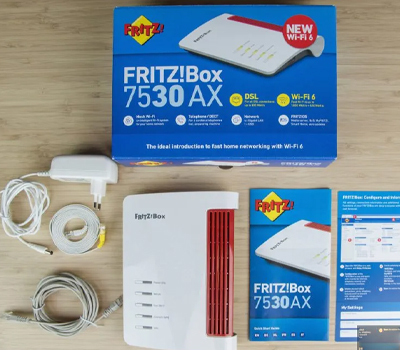
Before starting FRITZ!Box 7530 AX Setup, gathering everything first helps avoid interruptions later.
You will need:
- FRITZ!Box 7530 AX router
- Power adapter and cables
- Internet connection (DSL or fiber via modem)
- Smartphone, tablet, or computer
- FRITZ repeater (if using mesh)
In addition, place the router in a central location. This improves signal strength and helps later when you begin how to set up fritz repeater devices.
How to Complete FRITZ!Box 7530 AX Setup
First, connect the FRITZ!Box to the power source. Then connect it to the internet line or modem. After that, wait until the router lights stabilize.
Next, connect your device to the FRITZ!Box Wi-Fi. The default network name and password are printed on the router label. Once connected, open a web browser and enter fritz.box.
The setup wizard opens automatically. Follow the on-screen steps to:
- First, select language and region
- Then, configure the internet connection
- Lastly, create a Wi-Fi name and password
After saving the settings, the router restarts. At this point, FRITZ!Box 7530 AX Setup is complete, and basic internet access becomes available.
How to Set Up FRITZ Repeater 1200 AX
To begin the Fritz Repeater 1200 ax setup, place the repeater near the router during initial pairing. Plug it into a power outlet and wait for the LED to start blinking.
Then press the Connect button on the FRITZ!Box. Within two minutes, press the Connect button on the repeater. After a short wait, the devices sync automatically.
This process explains how to set up fritz repeater quickly without manual configuration.
Default Login and Password for FRITZ Repeater 1200 AX
During setup, users often look for the Fritz Repeater 1200 ax default password. In most cases, the repeater copies the Wi-Fi credentials from the FRITZ!Box automatically.
If manual access is needed, the default password is printed on the repeater label. This password allows access to the repeater settings through the browser.
Knowing the Fritz Repeater 1200 ax default password is helpful when troubleshooting or adjusting settings later.
How to Configure FRITZ Repeater 1200 AX?
After connecting, simply enter fritz.box or the address of the repeater in your browser. The subsequent user interface allows users to view signal strength, position, and Mesh status.
The question “How to configure FRITZ repeater 1200 AX?” is answered by simply confirming that the repeater is connected to the mesh and is located in the correct position.
Solving Fixing Fritz Repeater 1200 AX Setup Not Working Issue
Sometimes, Fritz repeater 1200 ax setup not working errors may appear. However, most problems are easy to solve.
Common fixes include:
- Moving the repeater closer to the router
- Restarting both devices
- Repeating the connect button process
- Resetting the repeater if needed
If fritz repeater 1200 ax setup is still not working, checking firmware updates usually helps.
Best Placement Tips for Router and Repeater
Placement matters more than many users expect. Therefore, keep the router in a central open space. Avoid thick walls, metal objects, and enclosed cabinets.
Place the repeater halfway between the router and the weak signal areas. This improves performance and reduces dropouts after FRITZ!Box 7530 AX Setup is complete.
Benefits of Using FRITZ!Box 7530 AX with Repeater
Combining the router and repeater provides:
- First, strong Wi-Fi coverage
- Additionally, seamless roaming
- Moreover, easy management
- Finally, stable performance
Because of this, the AVM Fritz!Mesh Set 7530 AX Repeater AX1200 setup is ideal for medium to large homes.
Common Mistakes to Avoid During Setup
Some mistakes slow down the process. These include:
- Skipping firmware updates
- Placing the repeater too far away
- Ignoring default passwords
- Rushing through the wizard
Avoiding these issues makes FRITZ!Box 7530 AX Setup smoother and more reliable.
Final Thoughts
Some mistakes slow down the process. These include:
- Skipping firmware updates
- Placing the repeater too far away
- Ignoring default passwords
- Rushing through the wizard
FRITZ!Box 7530 AX Setup does not require expertise. However, if it has been set up properly, it will work efficiently on its own. When connected properly, it will work even better with the repeater.
Knowing how to configure the Fritz repeater, the Fritz repeater 1200 AX default password, and how to repair Fritz repeater 1200 AX setup issues, users therefore have control over their home network.
After all settings have been established, the FRITZ mesh system is able to offer reliable and fast connectivity using Wi-Fi.